Most law firm owners write AI prompts the same way they write intake scripts. Long, detailed, covering every scenario. It feels thorough. It also gets worse results.
New research from IBM, Meta, and a joint team at EPFL, Apple, and Mistral AI points in the opposite direction. The prompts that consistently perform best are shorter, not longer. They give the model a clear goal, a defined role, and a short list of constraints, then get out of the way.
For a law firm, this matters more than it sounds like it should. AI tools are already writing follow-up emails, drafting intake summaries, and prepping case notes. If the prompt is working against the model instead of with it, that output needs more editing, not less, which defeats the point of using AI in the first place.
Here are the three rules, the data behind them, and what they look like in an actual intake follow-up email.
Why Most Law Firm AI Prompts Underperform
The instinct when prompting an AI tool is to over-explain. Give it an example. Walk it through the steps. List every rule you can think of so nothing gets missed.
Three separate research efforts tested that instinct this year, and all three found the same thing. More structure in a prompt does not produce more reliable output. It produces the opposite. The model has to work harder to figure out which instructions matter most, and something gets dropped.
The fix is not a better prompt template. It is a shorter one, built around three specific rules.
Rule 1: Give the AI a Goal, Not an Example
The common approach to prompting is to paste in a past email, a past demand letter, or a past intake summary and tell the AI to “use this as a template.”
A joint research team from EPFL, Apple, and Mistral AI tested this directly. They ran the same task two ways: once with worked examples pasted into the prompt, and once with the example removed and replaced by a plain statement of the goal. The version with examples hit the intended outcome 74% of the time. The version with just a goal hit it 83.8% of the time, nearly a ten point jump.
The likely reason is that an example pulls the AI toward copying tone and structure instead of solving the actual problem in front of it. A goal gives the model room to use everything it already knows about writing a persuasive, professional email.
For a law firm, that means the next time you need a follow-up email, skip the “here’s one I sent before” approach. State what you actually need to happen. Something like: this lead went quiet after a consultation and needs to reply. That is the whole instruction.
Rule 2: Give the AI a Role, Not a Process
The other common instinct is to tell the AI to “think step by step,” walking it through a process before it answers.
IBM Research tested eight different prompting techniques across more than 430,000 evaluations. The classic step-by-step instruction underperformed. The technique that consistently produced the best results was simply assigning the AI a role before the request. Something like “you are an intake specialist measured on how many consultations turn into signed clients” did more for output quality than any process instruction did.
This is a small change with an outsized effect. Instead of walking the AI through your thinking, tell it who it is for this task and let it apply that framing on its own.
Rule 3: Cap It at Three Rules
The instinct to be thorough shows up again here. Keep it under 200 words. No legalese. Mention the deadline. Sound warm, not desperate. Sign with my name. Include a PS with my number. It reads like a complete brief.
Meta Superintelligence Labs tested this exact failure point across 15 models, including GPT and Claude, by steadily adding rules to a single prompt until performance broke down. Twelve of the fifteen models could not reliably follow more than three rules at once. At eight rules, every single instruction was followed correctly only 5.7% of the time, meaning in the overwhelming majority of cases, at least one rule got dropped.
The takeaway is not to strip your instructions down to nothing. It is to prioritize. Pick the three constraints that matter most for this task and leave the rest out. If there’s a fourth or fifth requirement that genuinely matters, run a second pass and ask the model to check its draft against those specifically.
Putting It Together: A Real Intake Follow-Up Email
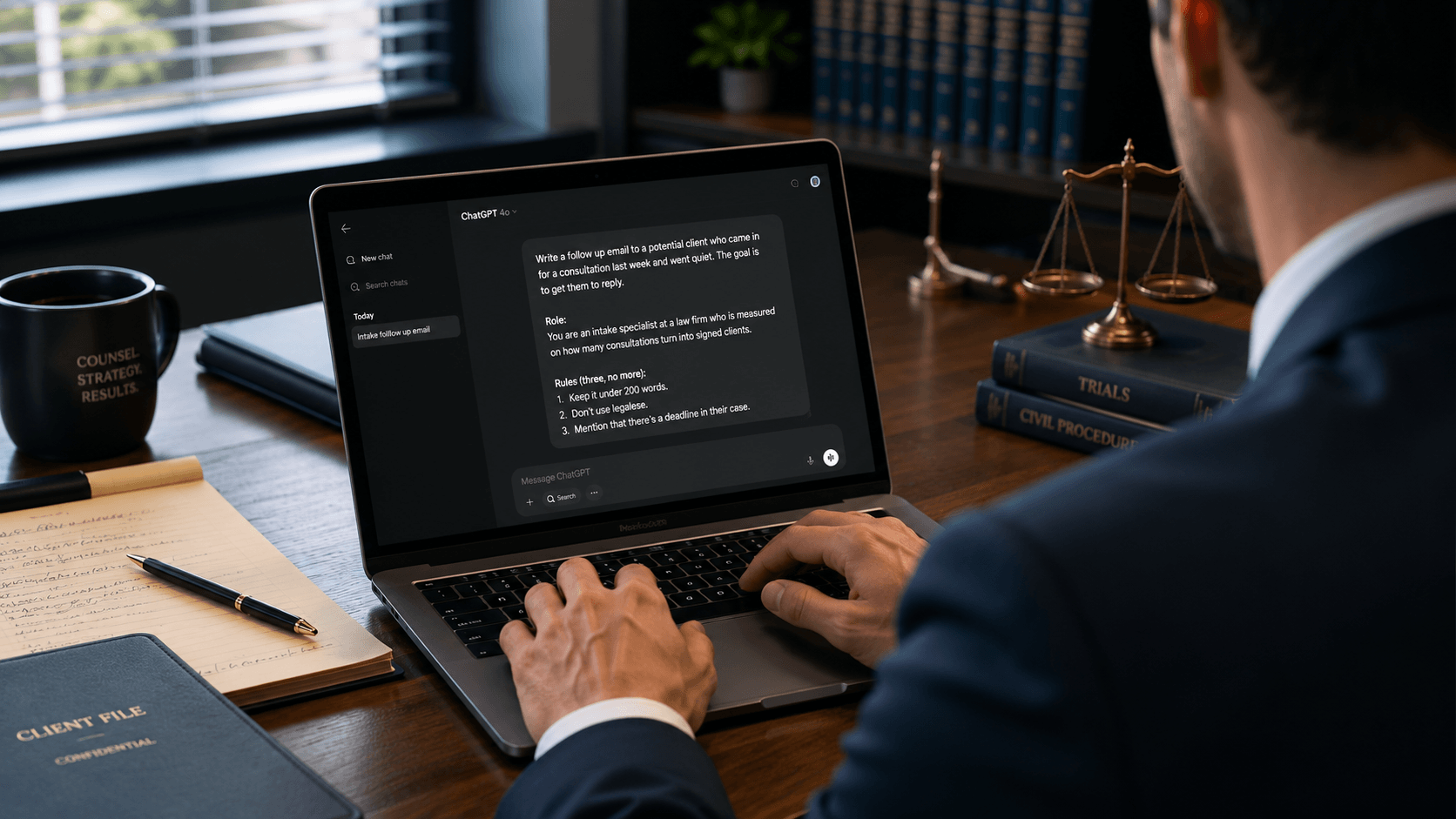
Here’s what these three rules look like stacked into a single prompt for a consultation that went cold.
The full prompt
- Role: You are an intake specialist at a law firm who is measured on how many consultations turn into signed clients.
- Goal: Write a follow-up email to a potential client who came in for a consultation last week and went quiet. The goal is to get them to reply.
- Rules (three, no more): Keep it under 200 words. Don’t use legalese. Mention that there’s a deadline in their case.
That’s the entire prompt. No pasted-in example email, no numbered steps, no ten-item checklist. Run through a modern AI model, it produces a warm, professional email that references the deadline, avoids sounding pushy, and gives the recipient a clear reason to respond, without needing five rounds of edits to sound like something your firm would actually send.
Firms that build these three rules into how they use AI stop treating every prompt like a one-off and start getting consistent output on the first try. That consistency is exactly what SMB Team’s IntakeOS is built around: turning follow-up from something that varies by person and mood into a standardized, repeatable system.
Get the exact prompts from this article
Download Andy’s free law firm AI playbooks for the prompts and rules covered here, ready to copy, paste, and use.
Download The Free PlaybooksThe Confidentiality Question: Running This Without Risking Your Bar License
None of this matters if it means putting client information at risk. That hesitation is a reasonable one, not a reason to avoid AI altogether.
The distinction that matters is which tier of a given AI tool you’re using. Consumer, free-tier versions of most AI platforms can use your inputs to train future models. Enterprise and business tiers, the ones built for confidential work, do not. That single setting is the difference between a tool you can safely use with case details and one you can’t.
For a law firm, that means the tool matters less than the tier. Whether the firm is using Claude, ChatGPT, or Gemini, the version needs to carry the same data protections banks and other regulated industries rely on, along with two-factor authentication and a clear policy against training on submitted data. Getting that confirmed before entering any client or lead information into an AI platform protects both attorney-client privilege and the firm’s bar license.
State bar advertising and communication rules still apply to anything AI helps draft, including client-facing emails. AI speeds up the writing. It doesn’t replace the review.
From Prompt to Sent Email Without Leaving the Window
The three rules above work in any AI chat window. But there’s a gap between drafting a great email and actually getting it out the door: pulling the lead’s information from the CRM, writing the draft, and sending it usually means bouncing between three or four different tools.
AI Workforce Pro, SMB Team’s AI platform built specifically for law firms, closes that gap. It gives access to Claude, ChatGPT, and Gemini models inside a single secure workspace, with the same enterprise-grade protections and two-factor authentication built in from the start. It connects directly to the CRM and email tools a firm already runs on, including Clio, HubSpot, Google Workspace, Microsoft, and more.
In practice, that means a prompt like the one built above doesn’t stop at a draft. The same request can pull the lead’s record straight from the CRM, generate the email with the firm’s details already filled in, and send it from the firm’s own email account after approval, all inside the same window. No copying case details between tabs, no separate login for the CRM, no manual send.
That’s the difference between using AI to write faster and using AI to actually close the loop on follow-up.
Frequently Asked Questions
Is it safe to use AI with client information?
It depends entirely on the tier of the platform being used. Free, consumer versions of most AI tools can use submitted data to train future models, which creates real confidentiality risk. Enterprise or business tiers, built with the same security standards as banks and two-factor authentication, are designed for exactly this kind of use. Confirm the tier and data policy before entering any client details.
What is the best way to prompt AI for legal work?
Give the AI a clear goal instead of a worked example, assign it a role relevant to the task, and limit the prompt to no more than three specific rules. Research from IBM, Meta, and a joint EPFL, Apple, and Mistral AI team all points to this same shorter, more focused structure outperforming longer, more detailed prompts.
Can AI send emails directly from my law firm’s CRM?
Yes, with the right platform. Tools like AI Workforce Pro connect directly to CRMs such as Clio and HubSpot, so a single request can pull a lead’s record, draft the email, and send it from the firm’s own email account after approval, without switching between separate tools.